Notebook Client
Demonstration
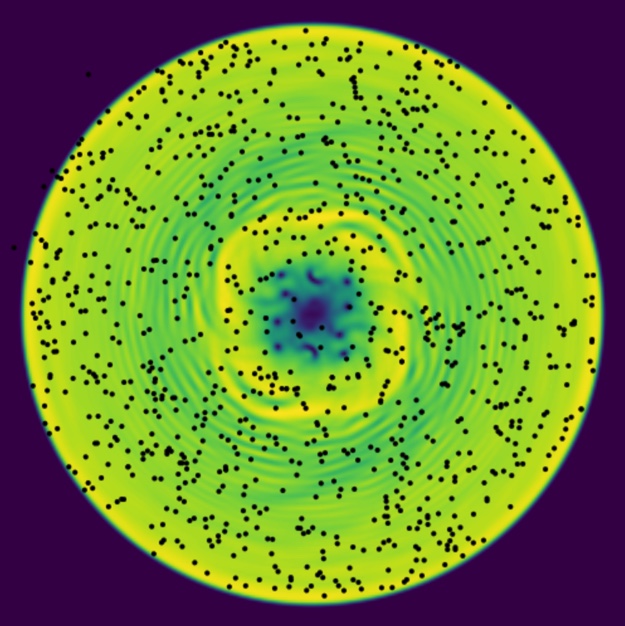
We start with a simple demonstration of a completed application. Here we launch both the server and the client on the same server.
%%javascript
IPython.OutputArea.prototype._should_scroll = function(lines) { return false; }
%pylab inline
from mmf_setup.set_path import hgroot
from super_hydro.clients import notebook
notebook.run(network_server=True, run_server=False, tracer_particles=0)
%pylab inline
from mmf_setup.set_path import hgroot
from super_hydro.clients import notebook
notebook.run(model='gpe.BEC',
             network_server=False, tracer_particles=0,
             Nx=256//4, Ny=256//4, cylinder=True)
%pylab inline
from mmf_setup.set_path import hgroot
from super_hydro.clients import notebook
notebook.run(model='gpe.BEC',
             network_server=True,
             Nx=256//4, Ny=256//4, cylinder=True)
Initial Stages
import numpy as np
import time
from matplotlib import cm
from super_hydro.clients import canvas_widget
canvas_widget.display_js()
canvas = canvas_widget.Canvas(width=521, height=100)
display(canvas)
tic = time.time()
for n in range(10):
    canvas.rgba = cm.viridis(np.random.random((100, 100)), bytes=True)
n/(time.time()-tic)
canvas.width
canvas.height = 512
%pylab inline
from mmf_setup.set_path import hgroot
from importlib import reload
from super_hydro.physics import helpers;reload(helpers)
from super_hydro.physics import gpe;reload(gpe)
from super_hydro.physics import gpe2;reload(gpe2)
from super_hydro.contexts import NoInterrupt
from super_hydro.server import server; reload(server)
from super_hydro.clients import notebook; reload(notebook); reload(notebook.widgets)

#notebook.run(model='gpe.BEC', Nx=256//4, Ny=256//4, cylinder=True)
#notebook.run(model='gpe2.SOC2', Nx=256//4, Ny=256//4)
notebook.run(model='gpe.BECFlow', Nx=32, Ny=32)
#notebook.run(run_server=False)
from mmf_setup.set_path import hgroot
import io
import numpy as np
from ipywidgets import FloatSlider, Image
import PIL.Image

A = (np.random.random((100, 100, 3))*255).astype('uint8')
img = PIL.Image.fromarray(A)
b = io.BytesIO()
img.save(b, 'jpeg')
from super_hydro import widgets as w

img = w.ipywidgets.Image(value=b.getvalue())
img.layout.object_fit = 'scale_down'
img.layout.width = "100%"
img.layout.width = "100%"
box = w.ipywidgets.Box([img])#, layout=dict(width='100%', height='100%'))
w.VBox([
    w.FloatSlider(),
    w.HBox([
        box,
        w.FloatSlider(orientation='vertical'),
])])
tic = time.perf_counter()
time.sleep(0.1)
time.perf_counter() - tic
app.run()
Design
We base the notebook client on the
IPyWidget library. This now has
support on Google’s CoLaboratory
This notebook provides a web-based client using matplotlib.
%pylab inline
from mmf_setup.set_path import hgroot
from importlib import reload
from super_hydro.clients import notebook; reload(notebook);
from super_hydro import widgets as w;reload(w)
import time
def draw1(d):
    IPython.display.display(PIL.Image.fromarray(d))

fig = plt.figure()
img = plt.imshow(d)


def draw2(d):
    img.set_data(d)
    IPython.display.display(fig)


n = 0
tic = time.time()
while True:
    draw2(d)
    n += 1
    print("{}fps".format(n/(time.time()-tic)))
    IPython.display.clear_output(wait=True)
import IPython.display
import PIL.Image
from io import StringIO
#Use 'jpeg' instead of 'png' (~5 times faster)
def showarray(a, fmt='jpeg'):
    f = StringIO()
    PIL.Image.fromarray(a[..., :3]).save(f, fmt)
    IPython.display.display(IPython.display.Image(data=f.getvalue()))
showarray(d)
d3 = d[..., :3]
from PIL import Image
Image.fromarray(d)
d.shape
import PIL
PIL.__version__
slider.trait_names()
import ipywidgets
slider = ipywidgets.IntSlider(description="Hi")
wid = ipywidgets.VBox([slider])
repr(wid)
import traitlets
class IntSlider(ipywidgets.IntSlider):
    name = traitlets.ObjectName().tag(sync=True)
repr(IntSlider(name="a"))
import ipywidgets
all_widgets = []
for _w in ipywidgets.__dict__:
    w = getattr(ipywidgets, _w)
    if isinstance(w, type) and issubclass(w, ipywidgets.CoreWidget):
        all_widgets.append(_w)
all_widgets
ipywidgets.VBox.__bases__[0].__bases__
import ipywidgets
from super_hydro import widgets as w; reload(w)
repr(w.Text())
layout = w.VBox([
        w.FloatLogSlider(name='cooling',
                         base=10, min=-10, max=1, step=0.2,
                         description='Cooling'),
        w.density])
layout.children
Signals
We would like to enable the user to interrupt calculations with signals like SIGINT. A use case is starting a server in a background thread, then launching a client. This works generally if we use mmfutils.contexts.NoInterrupt and the client blocks, but if the client is driven by the javascript so that the cell does not block, then the handling of signals can be broken, specifically if the ipykernel package is used, as this resets the handlers between cells. The latest version of mmfutils deals with this by redefining the pre_handler_hook and post_handler_hook methods of the kernel.
References:
cysignals: Might be a better option.
Event Loop
No Event Loop
I have been having an issue with figuring out how to update the display with data from the server. The simplest solution is to simply get data from the server, display it, then wait. This, however, does not allow the user to update the controls. (In the following example, the moving the slider does not change the value seen in python.)
import ipywidgets
import time
from super_hydro.contexts import NoInterrupt
frame = 0
_int = ipywidgets.IntSlider()
_txt = ipywidgets.Label()
_wid = ipywidgets.VBox([_int, _txt])
display(_wid)
with NoInterrupt() as interrupted:
    while not interrupted:
        frame += 1
        _txt.value = str(f"frame: {frame}, slider: {_int.value}")
        time.sleep(0.5)
Custom Event Loop
We can implement a custom event loop as long as we ensure that we call kernel.do_one_iteration() enough times. This will allow the widgets to work.
ip.kernel._poll_interval
import IPython
ip = IPython.get_ipython()
import ipywidgets
import time
from mmf_setup.set_path import hgroot
from super_hydro.contexts import NoInterrupt

_int = ipywidgets.IntSlider()
_txt = ipywidgets.Label()
_wid = ipywidgets.VBox([_int, _txt])
display(_wid)

with NoInterrupt() as interrupted:
    frame = 0
    while not interrupted:
        frame += 1
        _txt.value = str(f"frame: {frame}, slider: {_int.value}")
        for n in range(10):
            ip.kernel.do_one_iteration()
Browser Event Loop
Perhaps a better option is to allow the browser to trigger the updates when it is ready. This can be done in a couple of ways. The first is to use our own Canvas widget and register a callback and then use requestAnimationFrame to drive the updates. The second is to use the Play widget.
Canvas
With our Canvas widget, we can us requestAnimationFrame to drive the updates. This is probably the best solution as it saves energy if the browser tab is hidden. Here is the structure:
Use
requestAnimationFrame()to send a message to python that the browser is ready for an update.Wait until the browser performs an update.
Once the update is done, wait until the clock runs out (to limit the fps) then go to 1.
Play
One solution, is to use the Play widget, which sends update events as javascript messages. There are several issues with this:
All control of playback lies in the javascript. The python kernel does not block, so there is no way to interrupt from the kernel.
Infinite playback is not possible.
Sometimes javascript messages get lost (try making the interval very small).
Stop button and replay just change the counter. This is not ideal in terms of control.
Can’t figure out how to autostart this.
import ipywidgets
ipywidgets.Widget.close_all()
import time
from super_hydro.contexts import NoInterrupt
frame = 0
_int = ipywidgets.IntSlider(description="interval")
_txt = ipywidgets.Label()
_play = ipywidgets.Play(interval=1)
_wid = ipywidgets.VBox([_int, _txt, _play])
display(_wid)

def update(change):
    global frame, _txt, _int
    frame += 1
    _play.interval = _int.value
    _txt.value = str(f"frame: {frame}, slider: {_int.value}")

_play.observe(update, names="value")
Threads
One option for full control is to have the display updates run in a separate thread. Then we can control this with buttons in the GUI, or allow the update to be driven by the server.
import time
import threading
import ipywidgets
ipywidgets.Widget.close_all()
from super_hydro.contexts import NoInterrupt

_int = ipywidgets.IntSlider(value=100, description="interval")
_running = ipywidgets.ToggleButton(value=True, icon='play', width="10px")
_txt = ipywidgets.Label()
_play = ipywidgets.HBox([_running])
_wid = ipywidgets.VBox([_int, _txt, _play])
display(_wid)

def update(display):
    display.interval = _int.value
    _txt.value = str(f"frame: {display.frame}, slider: {_int.value}")

class Display(object):
    def __init__(self, running, update):
        self.interval = 1
        self.running = running
        self.update = update
        self.frame = 0

    def run(self):
        while self.running.value:
            self.frame += 1
            self.update(self)
            time.sleep(self.interval/1000)

disp = Display(running=_running, update=update)
thread = threading.Thread(target=disp.run)
thread.start()
import ipywidgets
import numpy as np
from matplotlib import cm
import PIL.Image
data = cm.viridis(np.random.random((32,32)), bytes=True)
img = PIL.Image.fromarray(data)
ipywidgets.Image(value=img._repr_png_(), format='png')
%pylab inline
from IPython.display import clear_output
import PIL
import time
import ipywidgets as w
from matplotlib import cm
Nxy = (64*4, 64*4)
data = np.random.seed(2)
N = w.IntSlider(min=2, max=256, step=1)
out = w.Output()
msg = w.Text(value="Hi")
display(w.VBox([N, out, msg]))
with out:
  tic = time.time()
  for _n in range(100):
    data = np.random.random(Nxy)
    img = PIL.Image.fromarray(cm.viridis(data, bytes=True))
    clear_output(wait=True)
    display(img)
    msg.value = f"fps={_n/(time.time()-tic)}"

#i = w.Image(value=img._repr_png_(), format='png')
l = w.Label(value="Hi")
import ipywidgets
ipywidgets.__version__
l = ipywidgets.Label(value="Hi")
l.trait_names()
import IPython, zmq
IPython.__version__, zmq.__version__
import ipywidgets
l = ipywidgets.Label(value="Hi")
import trace, sys
tracer = trace.Trace(
    #ignoredirs=[sys.prefix, sys.exec_prefix],
    trace=1,
    count=0)
tracer.run('ipywidgets.Label(value="Hi")')
Canvas
import numpy as np
N = 512
As = (np.random.random((10, N, N, 4))*255).astype(int)
As[..., 3] = 255
from mmf_setup.set_path import hgroot
import numpy as np
import ipywidgets
import IPython
import jpy_canvas
import time

from super_hydro.contexts import NoInterrupt
canvas = jpy_canvas.Canvas(data=As[0])
fps = ipywidgets.Label()
display(ipywidgets.VBox([canvas, fps]))
tic = time.time()
frame = 0
with NoInterrupt() as interrupted:
    for A in As:
        if interrupted:
            break
        #A = np.random.random((N, N, 3))
        canvas.data = A
        toc = time.time()
        frame += 1
        fps.value = f"{frame/(toc-tic)}"
%pylab inline
from mmf_setup.set_path import hgroot
import numpy as np
import ipywidgets
import IPython
import fastcanvas
import time

N = 512
from super_hydro.contexts import NoInterrupt
As = (np.random.random((10, N, N, 4)) * 255).astype('uint8')
As[..., 3] = 255
canvas = fastcanvas.RawCanvas(data=As[0])
fps = ipywidgets.Label()
display(ipywidgets.VBox([canvas, fps]))
tic = time.time()
frame = 0
with NoInterrupt() as interrupted:
    for A in As:
        if interrupted:
            break
        #A = np.random.random((N, N, 3))
        canvas.data = A
        time.sleep(0.05)
        toc = time.time()
        frame += 1
        fps.value = f"{frame/(toc-tic)}"
print(time.time() - tic)
import math

cv2 = fastcanvas.RawCanvas()

def gaussian(x, a, b, c, d=0):
    return a * math.exp(-(x - b)**2 / (2 * c**2)) + d

height = 100
width = 600

gradient = np.zeros((height, width, 4), dtype='uint8')

for x in range(gradient.shape[1]):
    r = int(gaussian(x, 158.8242, 201, 87.0739) + gaussian(x, 158.8242, 402, 87.0739))
    g = int(gaussian(x, 129.9851, 157.7571, 108.0298) + gaussian(x, 200.6831, 399.4535, 143.6828))
    b = int(gaussian(x, 231.3135, 206., 201.5447) + gaussian(x, 17.1017, 395.8819, 39.3148))
    for y in range(gradient.shape[0]):
        gradient[y, x, :] = r, g, b, 255

cv2.data = gradient
cv2
Density Widget
from density_widget import example
example.HelloWorld()
Custom Widgets
Here we build a custom widget.
%%html
<style type="text/css">
    canvas {
        border: 1px solid black;
    }
</style>
<canvas></canvas>
%%javascript
var canvas = document.querySelector('canvas');
canvas.width = 200;
canvas.height = 200;
var c = canvas.getContext('2d');
c.fillRect(10, 10, 10, 10)
import traitlets
traitlets.
from traitlets import Unicode, Bool, validate, TraitError, Instance, Int
from ipywidgets import DOMWidget, register

@register
class Canvas(DOMWidget):
    _view_name = Unicode('CanvasView').tag(sync=True)
    _view_module = Unicode('canvas_widget').tag(sync=True)
    _view_module_version = Unicode('0.1.0').tag(sync=True)

    # Attributes
    width = Int(200, help="Width of canvas").tag(sync=True)
    height = Int(200, help="Height of canvas").tag(sync=True)
%%javascript
require.undef('canvas_widget');

define('canvas_widget', ["@jupyter-widgets/base"], function(widgets) {

    var CanvasView = widgets.DOMWidgetView.extend({

        // Render the view.
        render: function() {
            this.canvas = document.createElement("canvas");
            this.canvas.width = this.model.get('width');
            this.canvas.height = this.model.get('height');
            this.el.appendChild(this.canvas);

            // Python -> JavaScript update
            this.model.on('change:width', this.width_changed, this);
            this.model.on('change:height', this.height_changed, this);

            // JavaScript -> Python update
            //this.email_input.onchange = this.input_changed.bind(this);
        },

        width_changed: function() {
            this.canvas.width = this.model.get('width');
        },

        height_changed: function() {
            this.canvas.height = this.model.get('height');
        },

        input_changed: function() {
            this.model.set('value', this.email_input.value);
            this.model.save_changes();
        },
    });

    return {
        CanvasView: CanvasView
    };
});
Canvas()
from traitlets import Unicode, Bool, validate, TraitError
from ipywidgets import DOMWidget, register


@register
class Email(DOMWidget):
    _view_name = Unicode('EmailView').tag(sync=True)
    _view_module = Unicode('email_widget').tag(sync=True)
    _view_module_version = Unicode('0.1.0').tag(sync=True)

    # Attributes
    value = Unicode('example@example.com', help="The email value.").tag(sync=True)
    disabled = Bool(False, help="Enable or disable user changes.").tag(sync=True)

    # Basic validator for the email value
    @validate('value')
    def _valid_value(self, proposal):
        if proposal['value'].count("@") != 1:
            raise TraitError('Invalid email value: it must contain an "@" character')
        if proposal['value'].count(".") == 0:
            raise TraitError('Invalid email value: it must contain at least one "." character')
        return proposal['value']
%%javascript
require.undef('email_widget');

define('email_widget', ["@jupyter-widgets/base"], function(widgets) {

    var EmailView = widgets.DOMWidgetView.extend({

        // Render the view.
        render: function() {
            this.email_input = document.createElement('input');
            this.email_input.type = 'email';
            this.email_input.value = this.model.get('value');
            this.email_input.disabled = this.model.get('disabled');

            this.el.appendChild(this.email_input);

            // Python -> JavaScript update
            this.model.on('change:value', this.value_changed, this);
            this.model.on('change:disabled', this.disabled_changed, this);

            // JavaScript -> Python update
            this.email_input.onchange = this.input_changed.bind(this);
        },

        value_changed: function() {
            this.email_input.value = this.model.get('value');
        },

        disabled_changed: function() {
            this.email_input.disabled = this.model.get('disabled');
        },

        input_changed: function() {
            this.model.set('value', this.email_input.value);
            this.model.save_changes();
        },
    });

    return {
        EmailView: EmailView
    };
});
Email()
Logging
from mmf_setup.set_path import hgroot
from importlib import reload
import super_hydro.utils;reload(super_hydro.utils)
l = super_hydro.utils.Logger()
l.debug("Hi")